For compliance leads at regional commercial general contractors

Know who can mobilize, who is expiring, and who is blocking payment.

Bring vendor insurance tracking into one operating view. Import your vendor list, request updated COIs from vendors or agents, and keep start-work and payment decisions tied to current coverage status instead of inbox follow-up.

  • No vendor login required
  • Approved, expiring, and not-ready vendor status
  • Weekly exception reporting and renewal follow-up
  • Secure document access and activity history

Built for the team keeping vendors moving: start with the compliance lead managing document follow-up, then give finance and project leaders a clear exception view when decisions are on the line.
See four key screens.

Review the key screens before you book time. They show how ClearMobilize tracks vendor status, sends document requests, gives vendors a simple upload path, and keeps renewals moving.

What you'll see

A clear preview before you book time.

Review the core screens here first. If you want the full sequence in motion, book a walkthrough or watch the short preview when it is available.

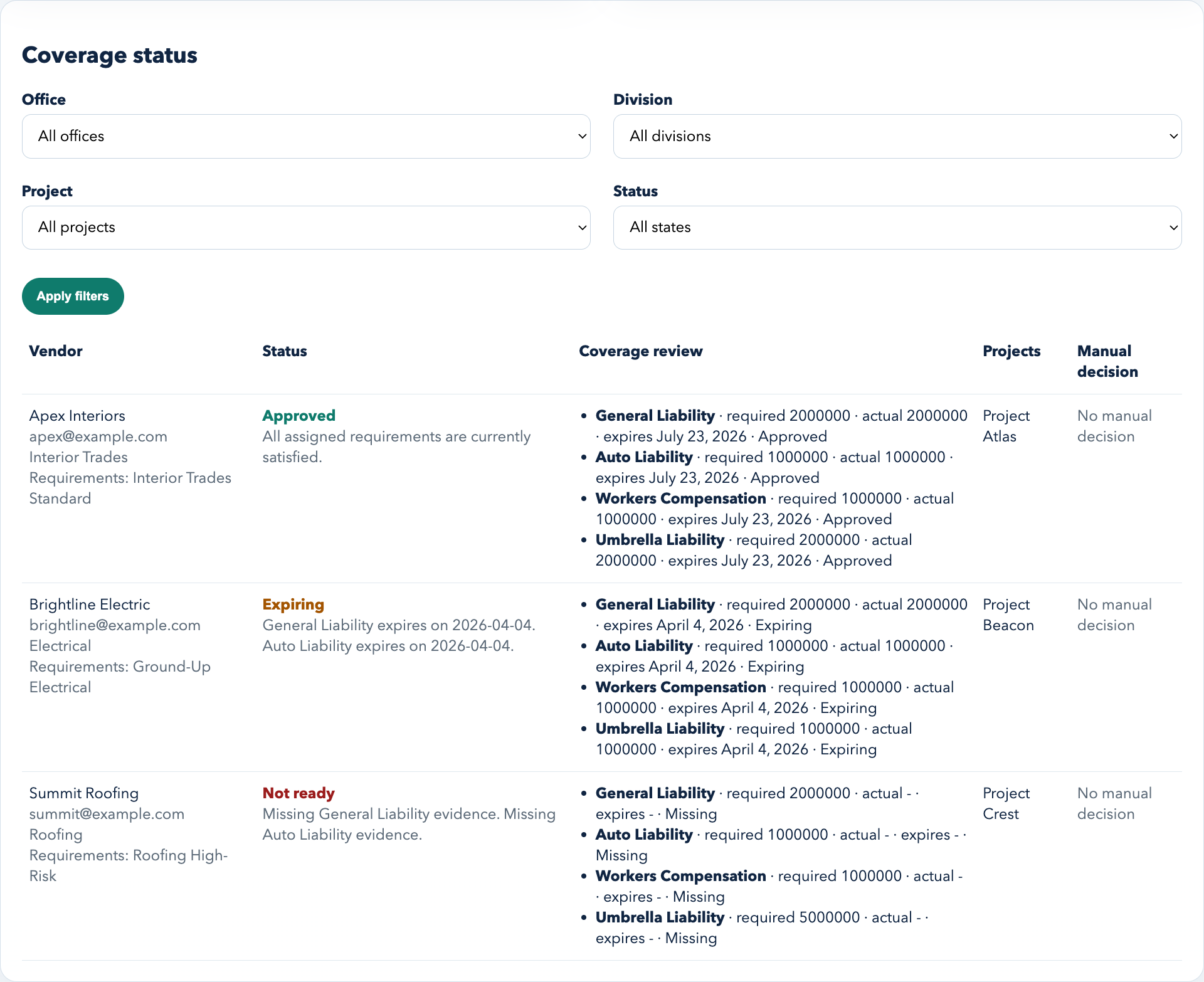
Coverage status board showing Apex Interiors approved, Brightline Electric expiring, and Summit Roofing not ready.
Screen 1

Status board before work starts or invoices move

See one roster with approved, expiring, and not-ready vendors so your team can answer the next readiness question quickly.

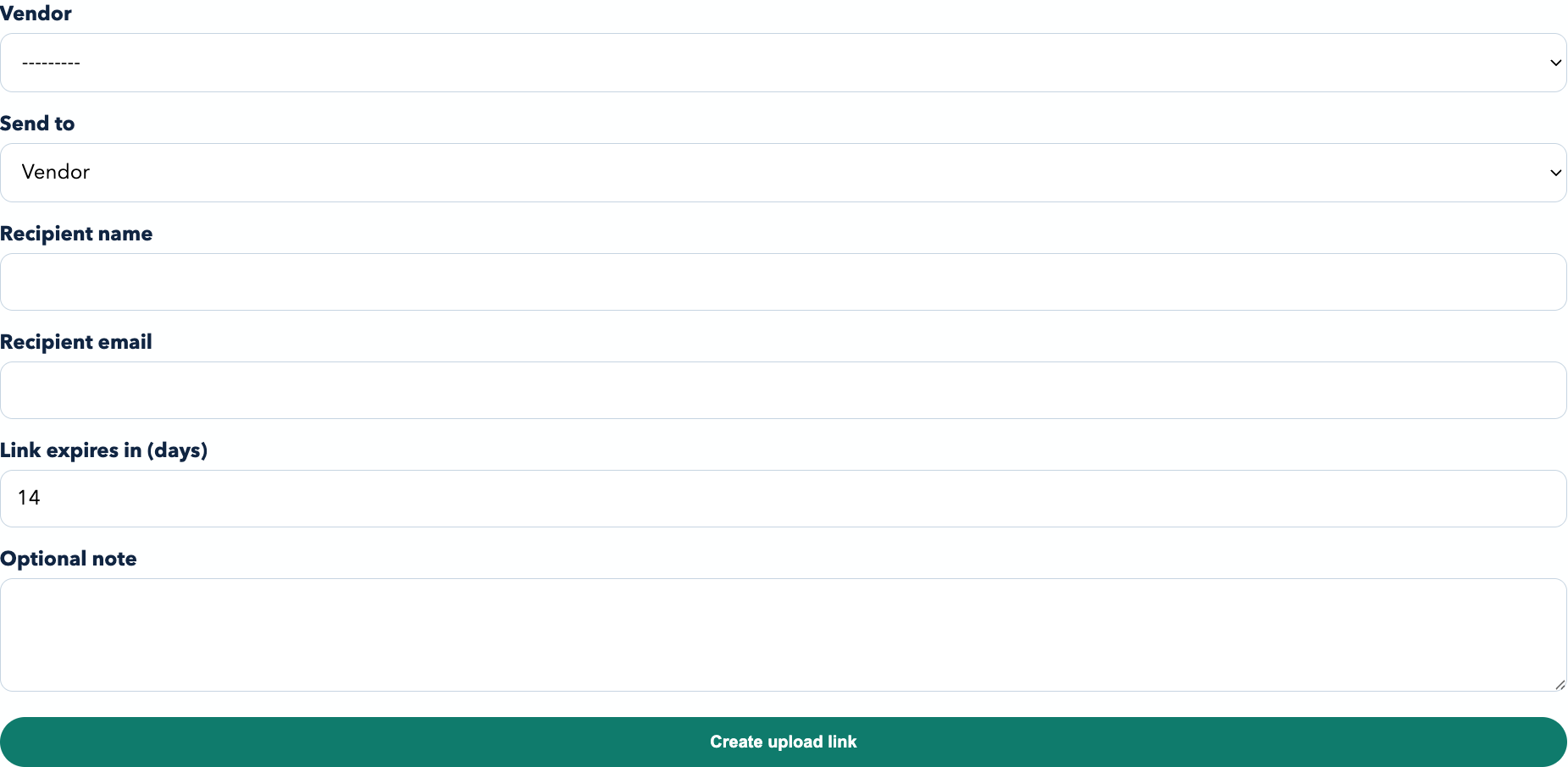
Document request form used to create a fresh upload link for the next vendor follow-up.
Screen 2

Send a document request in one step

Send a clean upload link from one request screen instead of building another follow-up email by hand.

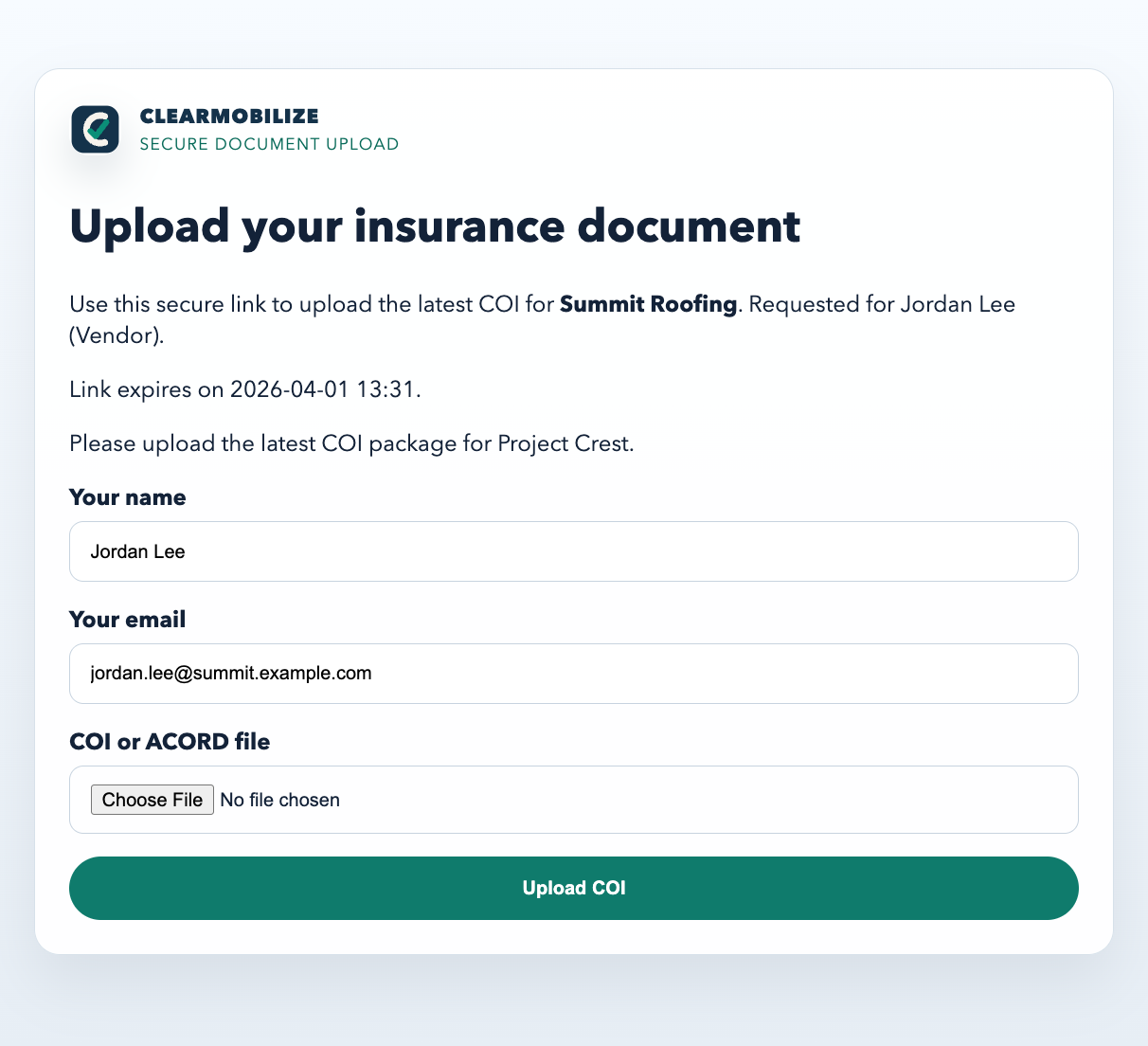
No-login public upload page for Summit Roofing showing the secure COI submission form.
Screen 3

No-login upload path for vendors and agents

Keep the handoff simple enough to get a response. The vendor or agent gets one secure page tied to the right request instead of account creation friction.

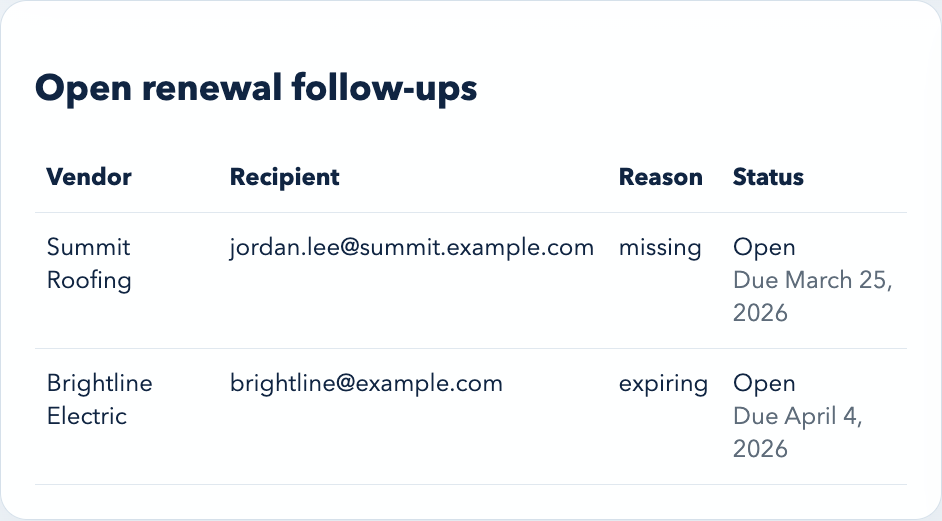
Renewal follow-up queue showing Summit Roofing and Brightline Electric with open follow-up status.
Screen 4

Renewal follow-up without losing the document trail

Keep reminders, document versions, and manual notes together so the team can explain both the current status and the last decision.

Built for the handoff that actually breaks.

When insurance follow-up lives across inboxes, spreadsheets, vendors, and finance, the team loses time and confidence. ClearMobilize gives the compliance lead one place to request, review, and share vendor status.

Primary user

Compliance lead

Use it when you need a clean answer before the next weekly review: who is cleared, who needs follow-up, and who is holding up work or payment.

  • One status view instead of email and spreadsheet cross-checking.
  • No-login vendor and agent upload flow to reduce response friction.
  • Manual decision notes, activity history, and document versions when exceptions happen.
Economic sponsor

Finance and project leadership

Leaders do not need another system to manage. They need a dependable weekly view of which vendors can slow payment or mobilization if nothing changes.

  • Weekly exception reporting for sponsor visibility without manual recaps.
  • Renewal follow-up that shows whether a blocker is being worked.
  • Clear documentation behind manual decisions and missing coverage calls.

What your team gets.

ClearMobilize covers vendor intake, document collection, coverage review, reporting, and follow-up in one operational flow.

Import

Import the vendor list you already have

  • CSV import supports the real starting artifact most teams already have.
  • Duplicate suggestions and merge flows keep the roster workable.
Requests

Secure upload links for vendors and agents

  • No vendor account creation required to submit updated COIs.
  • Document requests expire automatically and stay tied to the right vendor.
Extraction

Turn COIs into usable coverage details

  • Policy types, limits, carriers, and effective/expiration dates are captured.
  • Versioned documents preserve the underlying evidence behind each change.
Status

Keep one view across approved, expiring, and not-ready vendors

  • Requirements stay tied to trade and contract context.
  • Missing, expired, and clearly deficient cases surface without hiding the source documents.
Operations

Share weekly exceptions and trigger renewal follow-up

  • Export the exception set that finance or leadership actually wants to see.
  • Trigger renewal reminders before the blocker becomes a same-day scramble.
Controls

Keep documents and decisions traceable

  • Document access stays inside authenticated account permissions.
  • Manual decisions and key actions remain traceable.

Who ClearMobilize is built for.

ClearMobilize is focused on one job: helping regional commercial GCs collect COIs, keep coverage current, and answer readiness questions before work starts or invoices move.

Focus COI collection and coverage status

Built to help teams collect updated certificates, review coverage, and keep status visible when decisions are due.

Audience Regional commercial GCs

Built for the people who chase documents and answer readiness questions before work starts or invoices move.

Approach Start with compliance, support finance

Give the compliance lead the operating view first, then share a clear exception picture with finance and project leadership.

Walkthrough 20-minute walkthrough

Book a live walkthrough if you want to see the full sequence in action.